I usually keep four or five Claude Code sessions open in Windows Terminal, one per ticket. They run for minutes at a time, so I switch to something else, and then I lose track. A session has been sitting there waiting for my answer for ten minutes and I did not notice. When a notification did show up, it said "Claude Code" and nothing else, so I still had to check every tab.
I wanted two things: a toast that names the session and stays until I dismiss it, and a click on that toast that lands on the right tab. The first part was quick. The second part is the reason this article exists.
The result is a small plugin, claude-code-notify. This is what building it looked like.
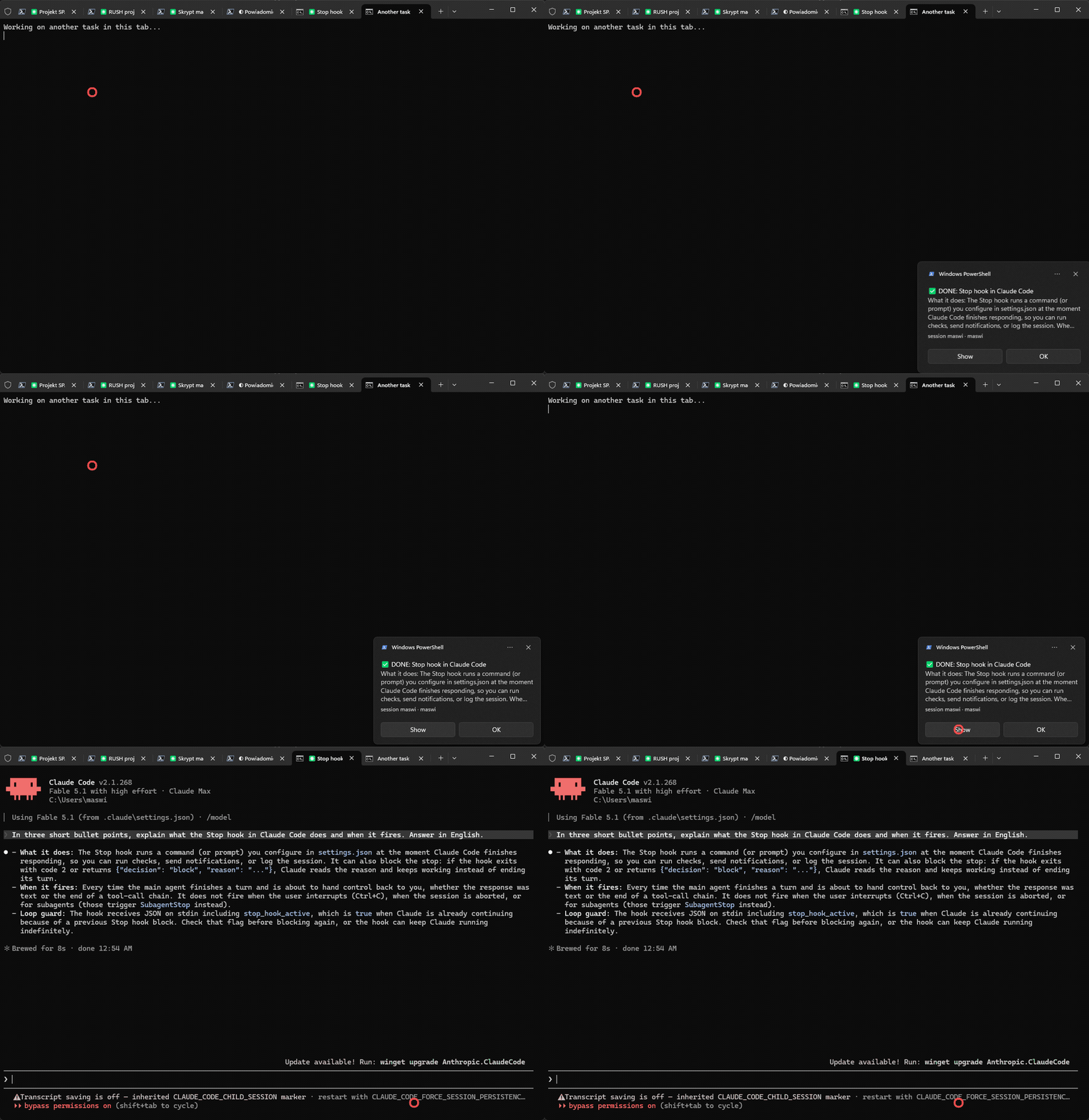
Step 1: A hook and a toast
Claude Code has hooks: shell commands that run on lifecycle events. Two of them matter here. Stop fires when Claude finishes its turn, Notification fires when it asks for permission or asks you a question. Each hook receives a JSON payload on stdin with the session id, the working directory and the path to the session transcript.
{
  "hooks": {
    "Stop": [{ "hooks": [{ "type": "command", "command": "bash notify.sh", "async": true }] }],
    "Notification": [{ "matcher": "permission_prompt|elicitation_dialog",
                       "hooks": [{ "type": "command", "command": "bash notify.sh" }] }]
  }
}
The session title is the interesting bit. Claude Code names each session after the first exchange and puts that name on the terminal tab. The same name is stored in the transcript as an ai-title entry, so the hook reads the tail of the transcript, takes the last ai-title and the last assistant message, and has everything a useful toast needs.
Windows toasts from a script go through WinRT in Windows PowerShell:
[Windows.UI.Notifications.ToastNotificationManager, Windows.UI.Notifications, ContentType = WindowsRuntime] | Out-Null
$doc = New-Object Windows.Data.Xml.Dom.XmlDocument
$doc.LoadXml($xml)   # <toast scenario="reminder"> ... </toast>
$t = New-Object Windows.UI.Notifications.ToastNotification $doc
$t.Tag = $sessionName   # a new toast from the same session replaces the previous one
[Windows.UI.Notifications.ToastNotificationManager]::CreateToastNotifier($appId).Show($t)
scenario="reminder" keeps the toast on screen until you click it. The Tag makes sure five sessions produce five toasts, not a pile.
Two things bit me here before anything worked at all. The hook script has to read stdin with a timeout, because if the pipe is not closed the script hangs until the hook timeout and the toast never appears. And PowerShell started as a detached process exits with code 0 and shows nothing, so the toast process must stay attached to its parent.
Step 2: Making the click do something
A toast can carry a launch attribute with a URL. If the URL uses a custom scheme registered under HKCU\Software\Classes, Windows runs the registered command when the toast is clicked. No administrator rights needed.
New-Item 'HKCU:\Software\Classes\claudefocus\shell\open\command' -Force
Set-ItemProperty ... -Value 'wscript.exe //B "focus.vbs" "%1"'
The toast gets launch="claudefocus:...", the click runs focus.ps1, and the script has to find the right tab. Windows Terminal exposes its tabs through UI Automation as TabItem elements under a window of class CASCADIA_HOSTING_WINDOW_CLASS, with the tab title as the name. Match the title, call SelectionItemPattern.Select(), done.
It worked from my shell. It did not work from the toast.
Step 3: The click sees no tabs
From the toast, the script found the Windows Terminal window and zero tabs inside it. Same script, same machine. I launched it via explorer.exe claudefocus:..., which is what a toast click effectively does, and reproduced it: window found, tabs empty.
Then I tried the other route, wt.exe -w 0 focus-tab -t N, which switches tabs by index without UI Automation. From the toast it did not switch anything. It opened a brand new terminal window.
The answer was elevation. I run Windows Terminal as administrator. A process launched from a toast click runs at medium integrity, and User Interface Privilege Isolation stops a lower-integrity process from reading or driving a higher-integrity window. UI Automation sees the frame but not the content, and wt.exe cannot reach the elevated instance, so it starts its own. Nothing was broken. Windows was doing its job.
The two most popular notification tools for Claude Code stop exactly here and say so in their READMEs: on Windows the click raises the terminal window, tab targeting is not possible.
Step 4: Let someone else do the clicking
The hook itself runs inside the terminal, so it inherits the terminal's privilege level. If the hook starts a helper process, that helper is elevated when the terminal is, and it can drive the terminal freely.
So the design became:
- When sending the toast, the hook resolves the tab index right away (from inside the terminal, UI Automation works) and starts a hidden helper,
focus-watcher.ps1, if one is not running yet. A named mutex keeps it a singleton, and it exits when Windows Terminal closes. - The toast carries
claudefocus:<tab index>.<WT_SESSION>.<pid>.<title>. - The click handler does not touch the terminal at all. It writes a small JSON request file and exits.
- The helper polls for that file, sets
WT_SESSIONin its environment so thatwt -w 0targets the right window, runswt focus-tab -t N, and brings the window to the front.
if (Test-Path $req) {
  $r = Get-Content $req -Raw | ConvertFrom-Json
  Remove-Item $req
  $env:WT_SESSION = $r.session
  Start-Process wt.exe -ArgumentList @('-w', '0', 'focus-tab', '-t', "$($r.index)") -Wait
  Bring-ToFront $r.wtpid
}
WT_SESSION turned out to matter. Without it, wt -w 0 from an outside process is a coin flip about which window it means. With it, -w 0 means "the window that owns this session", which is exactly the one we want.
That was the version that worked with the terminal elevated and not elevated, from a real click.
What I kept from this
- Reproduce the failure path, not the happy path. Running the script from my shell proved nothing, because my shell was elevated too.
explorer.exe claudefocus:...was the honest test. - When a Windows API returns empty results with no error, check integrity levels before checking your code.
- A background helper started from the privileged side is a clean way around UIPI, and it stays inside the rules: nothing gets elevated that was not elevated already.
- Session titles change. The tab index is resolved at notification time, so if you reorder tabs between the toast and the click, you land one tab off. I can live with that.
The plugin installs with two commands inside Claude Code, and the Windows click handler with a third:
/plugin marketplace add MarekSwiechowicz/claude-code-notify
/plugin install notify@claude-code-notify
/notify:setup
Code, README and the demo are in the repository. If you use a different terminal and want the click to work there, open an issue and tell me what you use.